Recipe Pack Concepts
Recipe Packs define how resources are deployed in Radius. While a Resource Type defines the interface used to request a resource, a Recipe Pack defines the implementation: the Terraform configuration or Bicep template that is called to perform a deployment and the parameters passed to the recipe.
What is a Recipe Pack?
While Resource Types are abstract and application oriented, a Recipe Pack is concrete and cloud provider-specific. It maps each Resource Type to the recipe that provisions it. Changing the Recipe Pack changes how resources are deployed without changing the applications that use them.
Because deployments only happen through a Recipe Pack, Recipe Packs are also how a platform enforces security, operational, and cost best practices. A resource is requested by its Resource Type, and the approved Recipe Pack determines how that resource is actually created.
The term recipe is used because Radius uses existing Infrastructure as Code (IaC) solutions to perform the actual deployment. Today, Radius supports both Terraform and Bicep, and is designed to integrate with other IaC solutions in the future. As long as there is a Terraform provider or Bicep extension, Radius can deploy the resource. In most cases an existing Terraform configuration or Bicep template can be used as a recipe with only minor changes. A community module, such as one from the Terraform Registry or an Azure Verified Module, can even be referenced directly as a recipe without modification.
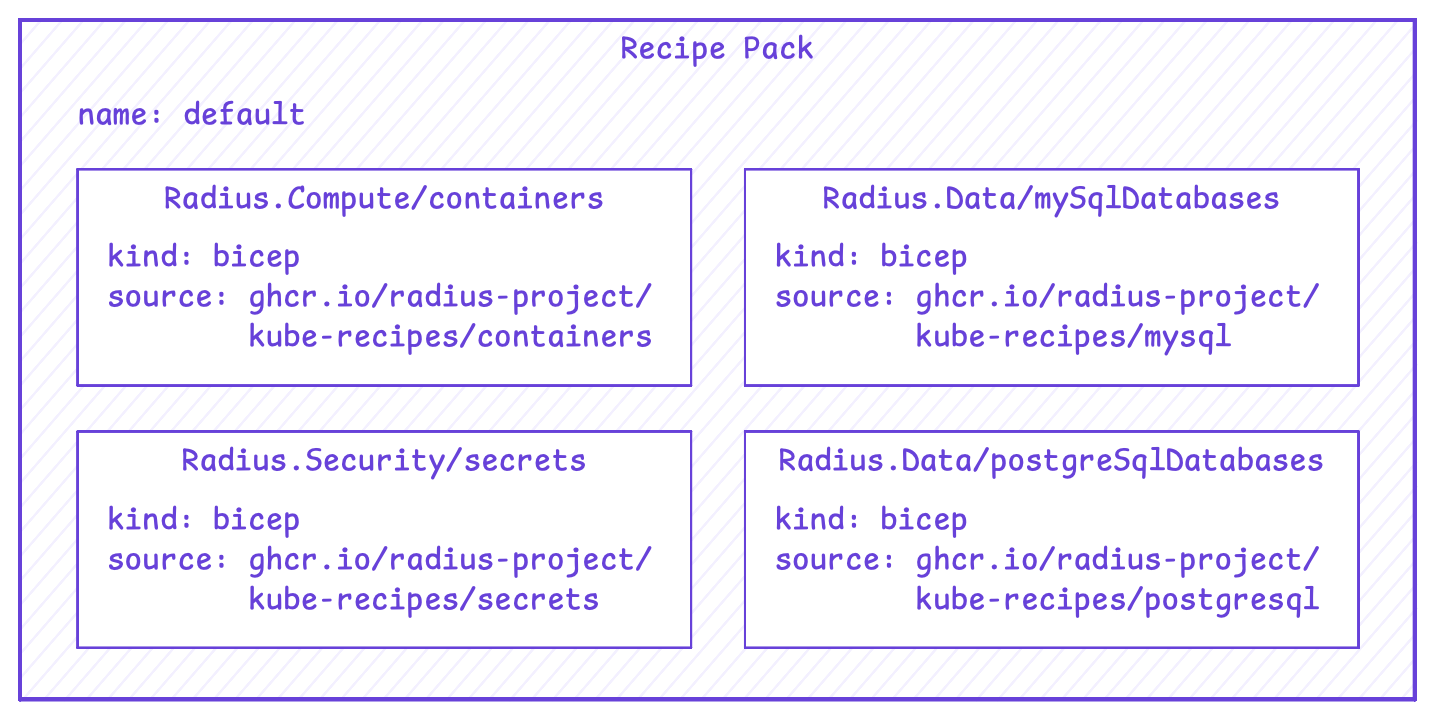
For each Resource Type, a Recipe Pack defines:
- The recipe kind: The IaC language used to deploy the resource, either Bicep or Terraform.
- The recipe source: Where the recipe is stored, such as an OCI registry for a Bicep template or a module source for a Terraform configuration.
- Recipe parameters: Optional parameter values that Radius passes to the recipe when a resource is deployed.
A single Recipe Pack can contain recipes for many Resource Types, so one Recipe Pack can describe how to deploy databases, caches, message queues, and any other Resource Type the platform supports.
When Radius is installed a default Recipe Pack is created:
How Recipe Packs relate to Environments
Recipe Packs are separate resources from Environments, and the two are connected by reference. An Environment lists the Recipe Packs it uses. This enables a single Recipe Pack to serve the development, staging, and production Environments at the same time.
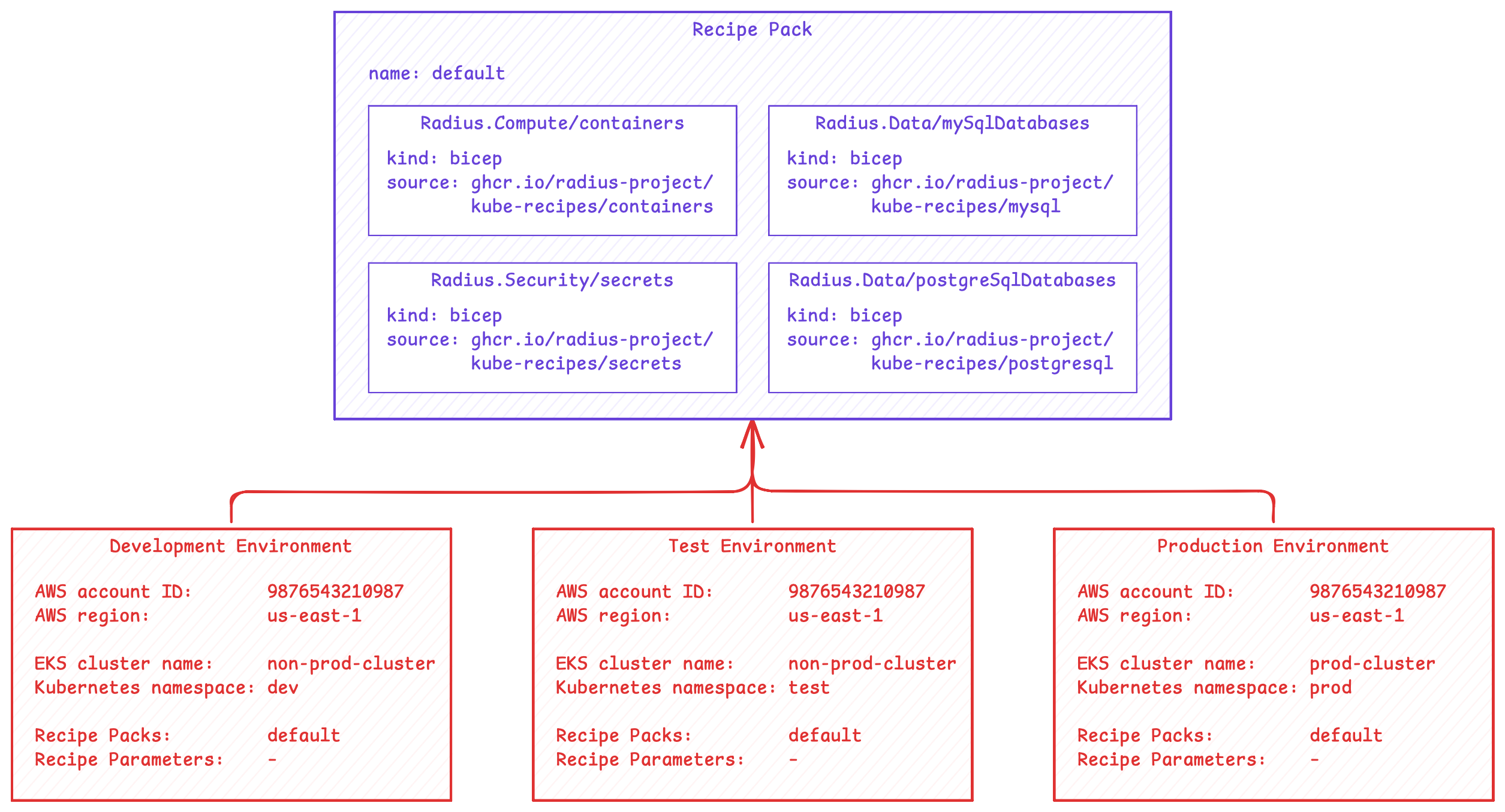
An Environment can reference more than one Recipe Pack. When multiple Recipe Packs are referenced, the aggregate set of Resource Types across those Recipe Packs must be unique, so no two Recipe Packs define a recipe for the same Resource Type.
Recipe parameters
Recipe parameters customize how a recipe behaves without changing the recipe itself. They are set at two levels:
- Recipe Pack parameters: Defined in the Recipe Pack and applied to every Environment that references it. These act as defaults, such as a standard database version or a common set of tags. For example, the recipe for the
Radius.Compute/routesResource Type needs the name of the Kubernetes gateway controller. Setting this parameter in the Recipe Pack ensures every route uses the same gateway controller regardless of which Environment references the Recipe Pack. - Environment parameters: Defined in the Environment and applied only to that Environment. These capture per-environment differences such as instance size, region, or credentials. For example, a production Environment can set a parameter indicating the environment type (such as
prodversusnon-prod) that is passed to a database recipe. The recipe can then enable high availability and automated backups only when the parameter indicates a production Environment.
When a parameter is set in both places, the value defined on the Environment overrides the value defined in the Recipe Pack. This is what allows a single Recipe Pack to be reused across many Environments while still producing appropriately configured infrastructure in each one.
How recipes are executed
Recipes can be new or existing Terraform configurations or Bicep templates. When a resource is deployed via Radius, the Radius control plane (specifically the Application RP) uses the Environment to find the Recipe Packs it references, then locates the Recipe for the requested Resource Type within those Recipe Packs. It then executes the Terraform or Bicep binary within the Application RP container and passes the Recipe location as a command-line argument.
When executing the Terraform or Bicep binaries, Radius does several things:
- Performs
terraform initif needed and sets up a Terraform backend. - Sets up authentication to OCI registries where Bicep templates are stored using the
bicepSettingsproperty on the Environment. - Sets up authentication to Git repositories where Terraform configurations are stored using the
terraformSettingsproperty on the Environment. - Sets environment variables with AWS and Azure credentials. These are well-known environment variables used by AWS and Azure Terraform providers and Bicep.
- Passes in a Terraform variable or Bicep parameter called
contextwhich is discussed in detail below. - Passes in the Recipe parameters as Terraform variables or Bicep parameters, combining the defaults defined in the Recipe Pack with any overrides set on the Environment.
- Reads the
resultoutput and updates the resource in Radius (also discussed below).
Recipe context object
Radius automatically injects a context object when deploying resources. The context object is rich with contextual information about the Environment, Application, and the resource being deployed. This includes:
- The Application name
- The Environment name as well as Kubernetes, AWS, and Azure details
- Recipe parameters from the Recipe Pack and the Environment
- The resource name and all of its properties
- All connected resources and their properties
In addition to context, Recipe parameters are passed to the recipe. These parameters come from the Recipe Pack and the Environment, with Environment values overriding Recipe Pack defaults, and are set as Terraform variables or Bicep parameters.
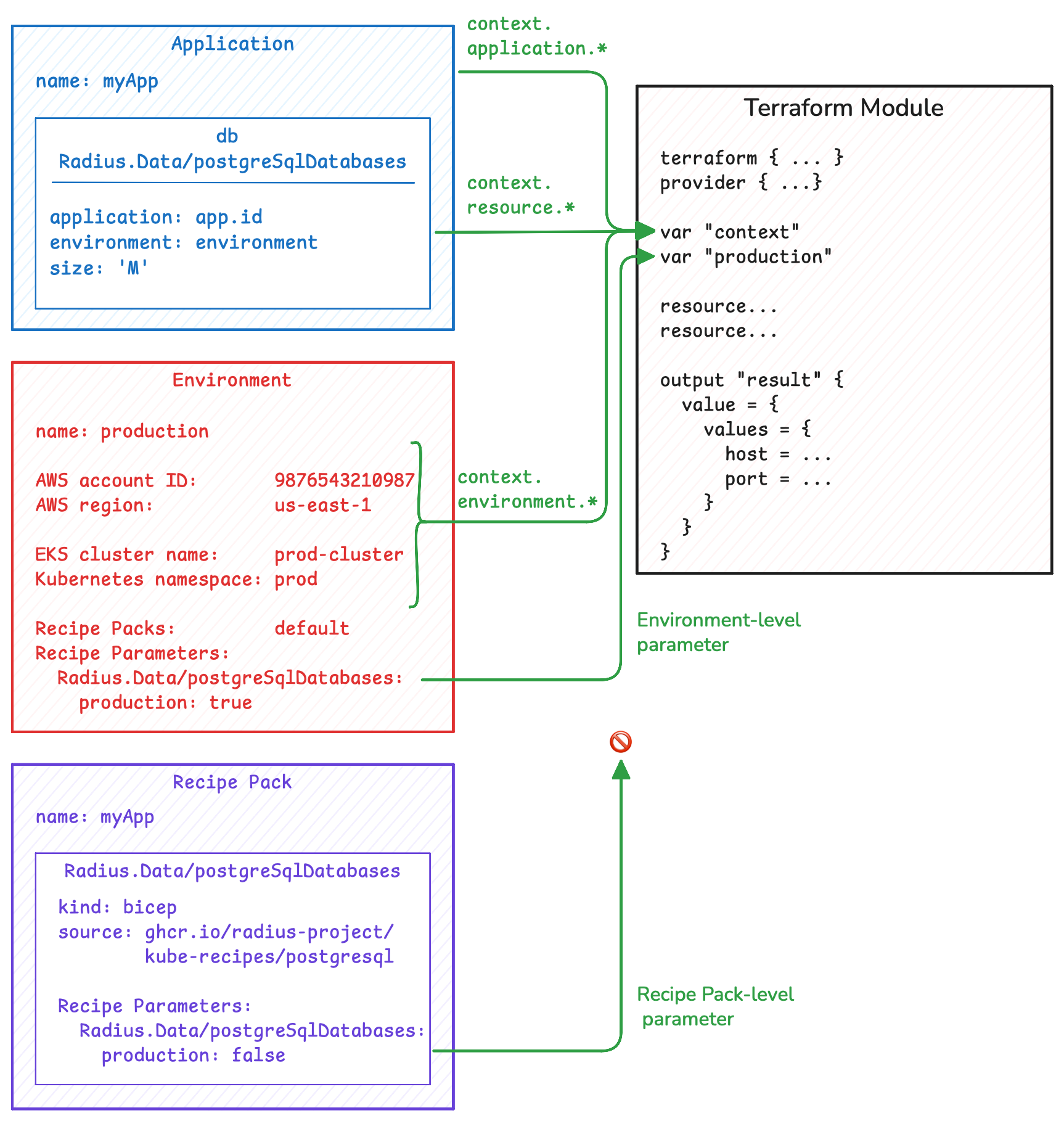
By using the context object and Recipe parameters, Recipes have all the information needed to deploy the actual resource in the target location. This significantly reduces the amount of information needed when defining an application.
Recipe outputs
Once the Recipe has been executed, Radius looks for a result output. The result output should contain output values for each of the read-only properties defined in the Resource Type so that Radius can set the read-only properties for use in the application definition. The result output should also include the resources created so Radius can track dependencies and manage deletions.
Next step: Read about Environments
Feedback
Was this page helpful?
Glad to hear it! Please feel free to star our repo and join our Discord server to stay up to date with the project.
Sorry to hear that. If you would like to also contribute a suggestion visit and tell us how we can improve.